
×
July 30, 2026 |
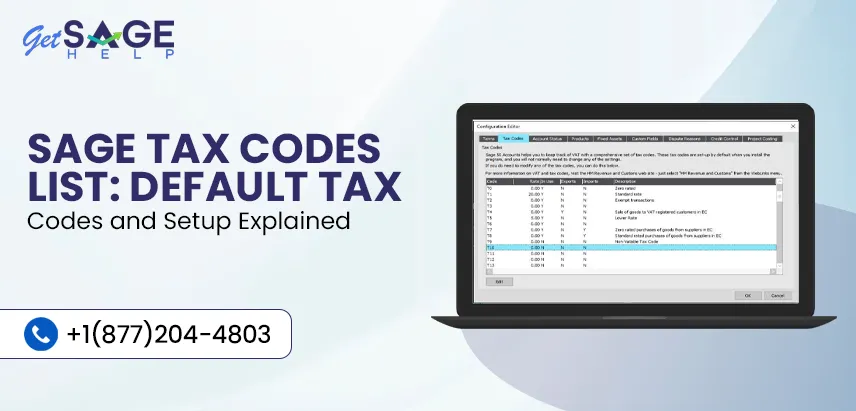
Tax codes in Sage 50 Accounts determine how VAT is applied to your sales and purchase transactions. Selecting the correct tax code ensures VAT is calculated accurately and reported correctly on your VAT Return.
Sage 50 Accounts includes a set of default tax codes for different VAT scenarios. Knowing what each code means and when to use it can help you avoid posting errors and keep your records accurate. In this guide, we’ll explain the Sage tax codes list, default tax codes, and how to set them up in Sage 50 Accounts.
Tax codes are predefined VAT settings used to calculate tax on transactions entered in Sage 50 Accounts. Every time you record a sale, purchase, invoice, or credit note, the selected tax code tells Sage how that transaction should be treated for VAT purposes.
Each tax code is linked to a specific VAT rate and reporting method. Sage provides several default tax codes to cover common business transactions, and you can review or update them if your business requirements change.
Using the correct tax code helps ensure your VAT is calculated correctly from the start. It also makes your VAT Return more accurate by posting transactions to the appropriate VAT boxes.
Incorrect tax codes can lead to reporting errors, incorrect VAT amounts, and extra time spent making corrections. Reviewing your tax codes regularly and using the right one for each transaction helps keep your accounts accurate and compliant.
Sage 50 Accounts comes with a set of default tax codes that cover the most common VAT scenarios. These codes are already configured within the software, so you can start recording transactions without creating tax codes from scratch.
Each tax code has a specific purpose, such as standard-rated, zero-rated, exempt, or other VAT treatments. Before changing any default settings, make sure you understand how the tax code is used, as it can affect your VAT calculations and VAT Return.
The table below lists the most commonly used default tax codes in Sage 50 Accounts. While T0 to T9 cover everyday VAT scenarios, additional tax codes are available for specific VAT treatments and may vary depending on your Sage 50 Accounts version.
| Tax Code | Description |
| T0 | Zero-rated VAT. Used for goods and services that are taxable at a 0% VAT rate. |
| T1 | Standard-rate VAT. Used for transactions subject to the current standard VAT rate. |
| T2 | Exempt VAT. Used for transactions that are exempt from VAT. |
| T3 | Used for specific VAT scenarios, including acquisitions of goods, depending on your Sage 50 Accounts version and VAT rules. |
| T4 | Used for specific VAT scenarios, including supplies of goods, depending on your Sage 50 Accounts version and VAT rules. |
| T5 | Reduced-rate VAT. Used for transactions that qualify for the reduced VAT rate. |
| T6 | Used for specific VAT scenarios, depending on your Sage 50 Accounts version and VAT rules. |
| T7 | Used for specific VAT scenarios, depending on your Sage 50 Accounts version and VAT rules. |
| T8 | Used for specific VAT scenarios, depending on your Sage 50 Accounts version and VAT rules. |
| T9 | No VAT. Used for transactions that are outside the scope of VAT. |
| T14-T19 | Used for import VAT and other VAT scenarios, depending on your Sage 50 Accounts version. |
| T20-T29 | Used for reverse charge and other special VAT scenarios available in supported versions of Sage 50 Accounts. |
Note: Some tax codes, particularly T3–T29, are intended for specific VAT scenarios and may vary depending on your version of Sage 50 Accounts. Always refer to Sage’s official documentation or consult your accountant before using these tax codes.
Read More:- Sage 50 Canada Edition
When you open a tax code in Sage 50 Accounts, you’ll see several fields that control how the code works. Understanding these settings can help you review existing tax codes or configure new ones when required.
| Field | Description |
| Tax Code | The unique code used to identify the VAT treatment, such as T0 or T1. |
| Description | A brief explanation of what the tax code is used for. |
| VAT Rate | The percentage of VAT applied when the tax code is selected. |
| VAT Return Boxes | Determines which boxes on the VAT Return the transaction is reported in. |
| Tax Types | Defines how the transaction is treated for VAT purposes. |
| Status | Indicates whether the tax code is active and available for use. |
Note: The fields available may vary slightly depending on your version of Sage 50 Accounts.
Sage 50 Accounts allows you to review the default tax codes and make changes where applicable. Before editing an existing tax code, make sure you understand how it affects your VAT calculations and reporting.
Follow these steps to view or edit a tax code:
When you enter a transaction, Sage 50 Accounts automatically applies a default tax code based on the information available. This helps speed up data entry and reduces the need to select a tax code manually for every transaction.
The default tax code is typically determined by:
If the automatically selected tax code isn’t appropriate for a particular transaction, you can choose a different one before saving the entry.
Using the correct tax code helps keep your VAT records accurate and reduces the chances of reporting errors. Here are a few best practices to follow:
Using the wrong tax code can affect your VAT calculations and lead to reporting errors. Before posting a transaction, always check that you’ve selected the correct tax code. It’s also a good idea to avoid changing the default tax codes unless you’re sure of their purpose.
If VAT rules change or you’re unsure which code to use, review your tax code settings or consult a tax professional before making any changes.
Tax codes are an essential part of managing VAT in Sage 50 Accounts. Using the correct tax code helps ensure your transactions are recorded accurately and your VAT Return reflects the right information.
By understanding the default tax codes and reviewing them regularly, you can reduce errors and keep your accounting records up to date. For further assistance, we recommend consulting to Sage ProAdvisors at +1(877)204-4803.
Tax codes in Sage 50 Accounts are short labels used to calculate, track, and report Value Added Tax (VAT) on sales and purchases. Common examples include T1 for the standard tax rate, T0 for zero-rated items, and T9 for transactions outside the scope of VAT.
Yes, you can edit default tax codes in Sage 50 by accessing the settings menu, selecting the specific tax code, and updating the rates or descriptions.
You can find tax codes in Sage 50 by going to the top menu and selecting Settings, then Company, and then Sales Taxes and Tax Codes (or via Settings > Configuration > Tax Codes depending on your regional version).
T1 is the default tax code in Sage 50 Accounts for transactions that are subject to the standard VAT rate. Sage also provides other default tax codes, such as T0, T2, T5, and T9, for different VAT treatments.
To change a tax code in Sage 50 Accounts, open the transaction, select Edit, choose the correct tax code from the T/C drop-down menu, and save your changes. If the transaction has already been VAT reconciled or allocated, you’ll need to reverse it and post it again with the correct tax code.
Yes, Tax codes determine how transactions are reported on your VAT Return. Using the correct tax code helps ensure your VAT calculations and VAT reporting are accurate.

Prefer speaking with a human to filling out a form? call corporate office and we will connect you with a team member who can help.
 +1(877)204-4803
Available 7 Days a Week 8:00 am - 10:00 pm (EST)
Chat with an Expert